Linux Mint 18.1 Desktop
Finally, you can automatically update Linux Mint.
You can now easily upgrade from Linux Mint 18 to 18.1 (or even from Linux Mint 17.1 to Linux Mint 17.2). In the past, you had to manually replace Mint while keeping your personal files in a home directory located on another partition, or by doing a full system reinstall.
.
Steps to Automatically Upgrade Linux Mint
- Update your existing Linux Mint installation with the latest patches.
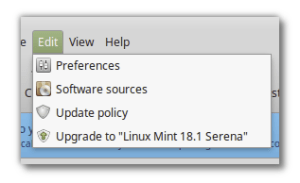
- From Update Manager, run the Upgrade to Linux Mint 18.1 option (from your Cinnamon or MATE desktop).
Linux Mint Upgrade from Update Manager




 Gary Reiner
 Comfortably Numm
Discussion
No comments yet.